What Is Predictive Dialing? How It Works, Comparison, Benefits & Checklist

What is Predictive Dialing?
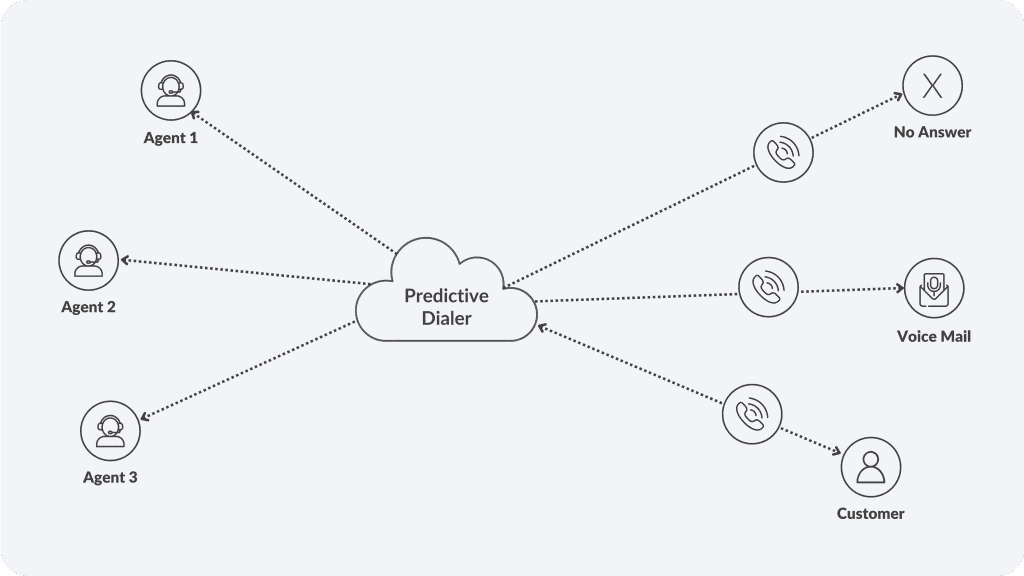
Predictive dialing is automated outbound calling technology that dials phone numbers from a contact list faster than human agents could manually. The system analyzes call outcomes, agent availability, and call handling time to predict when agents will finish current calls, then automatically dials the next number to connect a live person to an agent immediately.
Who needs it? Collections teams, telemarketing companies, appointment reminders, survey organizations, and sales outreach operations that make high-volume outbound calls.
Key difference: Traditional dialing requires agents to manually dial each number. Predictive dialing eliminates this dead time, letting agents focus entirely on conversations
How Predictive Dialer Works: Step-by-Step
Step 1: Contact List Upload System receives a database of phone numbers with associated customer data (name, account, call reason, previous outcomes).
Step 2: Algorithm Calculates Pacing The system analyzes historical data: average call duration, how many calls connect to live people (answer rate), average time agents need between calls (wrap-up time). Using this, it calculates how many numbers to dial per available agent.
Example: If average call duration is 5 minutes, answer rate is 40%, and wrap-up time is 1 minute, the system calculates it needs to dial 3-4 numbers to ensure one connects when an agent is ready.
Step 3: Automated Dialing Begins System automatically dials numbers ahead of agent availability. If someone answers immediately, the call routes to an available agent. If voicemail or no answer occurs, the system handles it per protocol (leaves message, logs outcome, moves to next call).
Step 4: Call Connection When a live person answers and an agent is available, the call connects instantly. Agent sees customer details on screen (name, account history, call reason). This pre-screen information helps agents start conversations productively.
Step 5: Call Recording & Logging All calls are recorded (with compliance), outcomes logged (answered, voicemail, busy, wrong number), and data feeds back into the algorithm to continuously improve pacing.
ClearTouch’s predictive dialing system automates this entire process while maintaining compliance monitoring.
Predictive vs. Preview vs. Progressive Dialing
| Dimension | Predictive | Preview | Progressive |
| Dialing method | Auto-dials ahead of agents | Agent dials manually | Auto-dials one number per agent |
| Agent control | Limited (system decides when) | Full (agent reviews before calling) | Moderate (system dials, then connects) |
| Speed | Fastest (3-4x more contacts) | Slowest (manual dialing) | Medium (1.5-2x more contacts) |
| Compliance risk | High (abandonment risk) | Low (agent controls pace) | Low (reasonable pacing) |
| Best for | High-volume, non-regulated calls | Complex consultative sales | Balanced campaigns |
Predictive Dialer Features & Compliance Guidelines
Core Features
- Intelligent pacing: Adjusts dialing rate based on agent availability and answer rates
- Call screening: Detects voicemail, busy signals, answering machines; routes only live connections to agents
- Customer data integration: CRM data displays instantly when call connects
- Call recording: Records all conversations with compliance logging
- Real-time analytics: Shows contact rates, agent productivity, campaign performance
- Do-Not-Call compliance: Automatically scrubs numbers against DNC registry
Compliance Requirements
TCPA (Telephone Consumer Protection Act):
- Requires prior express written consent for telemarketing/collections calls
- Respects Do-Not-Call registry
- Limits abandoned calls to <3% of calls placed
FDCPA (Fair Debt Collection Practices Act):
- Limits contact to 8 AM-9 PM in customer’s timezone
- Prohibits harassment or abusive language
- Requires debt collector identification
State-Specific Laws:
- Some states require 2-second delay before connecting agent (prevents abandonment)
- Recording consent varies by state (one-party vs. two-party consent)
- Telemarketing call times restricted in some states
Abandonment Rates: Industry best practice: Keep abandoned calls below 3%. Abandonment occurs when a live person answers but no agent is available to take the call within 2 seconds.
Predictive Dialer Benefits: Productivity & Connect Rates
Productivity gains:
- Agents spend 60-70% of time on actual conversations vs. 40% in manual dialing
- Average calls per agent increases 2-3x without additional headcount
- Reduces idle time between calls significantly
Contact rate improvements:
- Connects 3-4x more contacts per agent per day
- Answer rate typically 30-45% (most calls reach voicemail/machines)
- Successful contact rates increase due to volume
Revenue impact:
- Organizations report 20-40% improvement in campaign results
- Sales teams see higher appointment booking rates
- Collections teams recover more volume with same team size
Cost efficiency:
- $3-5 per successful contact vs. $10-15 manual dialing
- Reduces cost per sale/collection by 40-50%
- Improves ROI on outbound campaigns significantly
Risks & Pitfalls to Avoid For Predictive Detailing Systems
Legal risks:
- Exceeding abandonment rate violates TCPA (can result in $500-$1,500 fines per call)
- Calling DNC numbers results in FTC penalties
- Recording without consent violates state wiretap laws
Customer experience risks:
- Aggressive pacing increases customer anger (hang-ups, complaints)
- High abandonment rates damage brand reputation
- Excessive calls to same number violate harassment rules
Operational risks:
- Poor algorithm tuning leads to too many abandoned calls
- Lack of compliance monitoring exposes organization to liability
- Agent training gaps result in poor call quality despite high volume
Best Practices Checklist
Technical Configuration
- Set pacing rate at 1.2-1.5x (conservative, compliance-safe)
- Monitor abandonment rate daily (keep under 3%)
- Integrate with CRM for customer context on screen
- Test call quality regularly (record sample calls)
- Maintain DNC list scrubbing (update before each campaign)
Compliance Measures
- Document written consent before campaigns
- Verify caller ID is accurate (no spoofing)
- Limit calls to permitted hours (8 AM-9 PM customer time zone)
- Train agents on TCPA/FDCPA rules
- Maintain call recordings for 12+ months
- Audit DNC scrubbing monthly
Agent Training
- Train on customer context before answering
- Teach opening statements that build trust
- Emphasize call quality over speed
- Monitor calls regularly for compliance
- Provide feedback on abandonment impact
Campaign Optimization
- Start with low pacing rate; increase gradually
- A/B test different pacing rates
- Monitor conversion rate by time-of-day
- Adjust dialing rate based on answer rate changes
- Track contact quality, not just volume
How to Choose the Right Predictive Dialing Solution
Evaluate these capabilities:
- Scalability — Handles growing contact lists without performance degradation
- Compliance management — Built-in DNC scrubbing, TCPA monitoring, recording consent, call logging
- Pacing flexibility — Adjust dialing rate from 1.0 to 3.0+ to balance volume and quality
- CRM integration — Customer data displays instantly before agent answers
- Analytics & reporting — Real-time dashboard showing contacts, connects, conversations, outcomes
- Call quality — Low call drop rates, clear audio, minimal delays
Explore ClearTouch’s predictive dialing capabilities to compare features with competitors
Measuring Effectiveness: Key Metrics
Volume metrics:
- Contacts per agent per hour — How many people contacted
- Dials per contact — Efficiency indicator (lower is better)
- Answer rate — % of calls reaching live people
Quality metrics:
- Abandonment rate — % of answered calls with no agent available (keep <3%)
- Call duration — Average length of conversations
- Call quality score — Customer satisfaction with conversation
Business metrics:
- Conversion rate — % of contacts resulting in desired outcome (sale, appointment, payment)
- Cost per contact — Total campaign cost divided by contacts
- Campaign ROI — Revenue generated vs. campaign cost
Getting Started
Predictive dialing systems significantly boost outbound campaign productivity when implemented correctly. The key is balancing volume with quality while maintaining strict compliance.
Ready to implement predictive dialing?
Request a demo to see predictive dialing in action
Frequently Asked Questions
The system analyzes call duration, answer rate, and agent availability. Auto-dials numbers ahead of agents. Routes live connections to agents immediately
TCPA, FDCPA, DNC registry compliance mandatory. Keep abandonment below 3%. Respect contact hour limits. Record with consent. Identify debt collectors
Pacing: number of dials per agent (higher pacing increases contacts/volume). Abandonment: answered calls without available agents (keep below 3% to avoid fines)
Start with conservative pacing (1.2-1.5x). Display customer data before call connects. Minimize wrap-up time. Monitor call quality continuously.
Predictive: auto-dials ahead (fastest). Preview: agents review before dialing (slowest). Progressive: auto-dials one per agent (balanced).
Track contacts, answer rate, abandonment rate, conversion rate, cost per contact. Monitor call quality alongside volume.