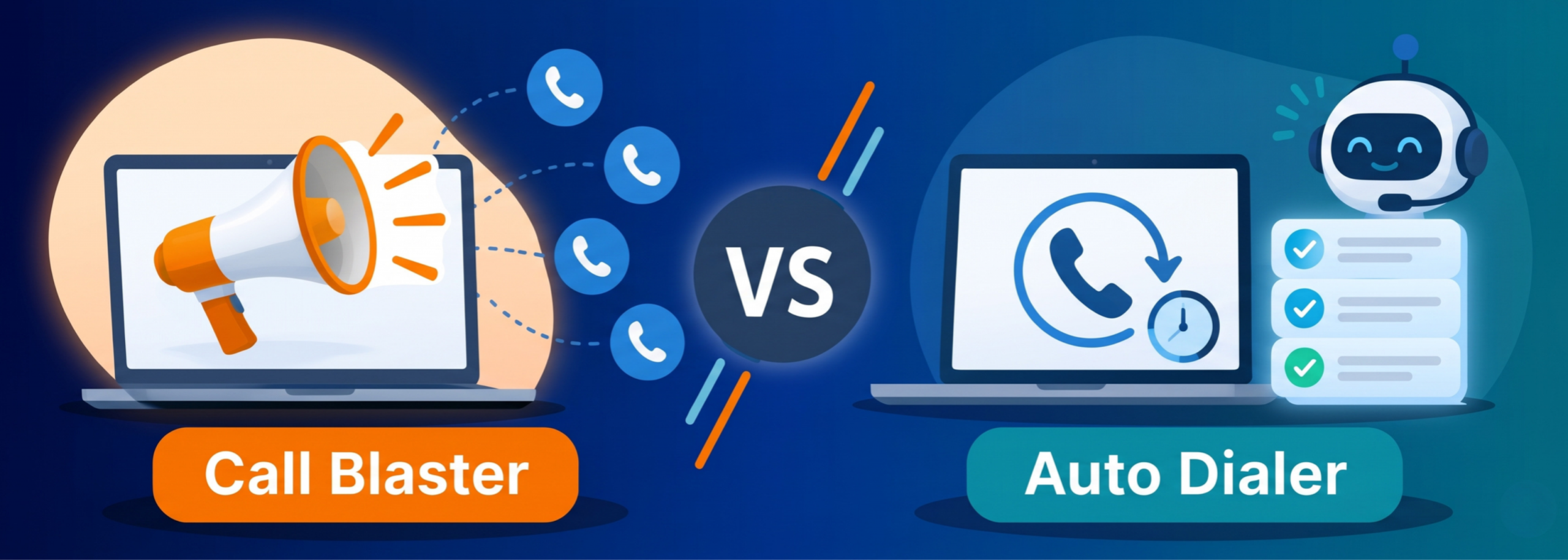
Call Blaster Vs. Auto Dialer

I stopped counting a long time ago how often someone asks me, “So is a call blaster just a cheaper auto dialer?” It usually comes up about ten minutes into a sales conversation, right after we’ve agreed on everything else.
It’s a fair question. Both tools dial numbers so your team doesn’t have to, and both sell the same promise: reaching more people in less time. But they solve very different problems. Pick the wrong one, and it can cost you money, customer goodwill, and, in some markets, a regulator’s attention.
So, here’s how I explain the difference, roughly the way I would over coffee.
What Is a Call Blaster?
A call blaster, also called voice broadcasting, does one thing really well. It calls a big list of numbers at once and plays a prerecorded message to whoever picks up. If voicemail answers, most systems can leave the message there instead.
There’s no agent waiting on the other end. The message is the whole point. Some setups add a simple keypad option, like “press 1 to confirm your appointment” or “press 2 to speak to someone,” but the call starts with the recording and usually ends with it too.
I think of it as a megaphone. You can reach thousands of people in an hour, but it’s a one-way conversation by design.
What Is an Auto Dialer?
An auto dialer also dials automatically, but its job is to get a live person on the line with a live agent. It does the dull work of dialing and sitting through rings, so your agents spend their time talking.
Most platforms give you a few modes, and the gap between them matters more than most demos let on:
- Preview dialer: the agent reviews the contact first, then dials.
- Progressive dialer: it dials the next number as soon as an agent is free.
- Power dialer: it dials several numbers per free agent, at a set ratio.
- Predictive dialer: it uses answer rates and agent availability to decide how far ahead to dial.
If the call blaster is a megaphone, the auto dialer is a switchboard operator who never takes a break.
Call Blaster vs Auto Dialer: Key Differences
The simplest way I’ve found to put it: a call blaster delivers a message, and an auto dialer delivers a conversation. Almost every other difference follows from that.
| Call blaster | Auto dialer | |
| Main goal | Push one message to many people | Connect people to live agents |
| Who speaks first | A recording | An agent |
| Agents needed | None, or a few for callbacks | A full team on shift |
| Calls per hour | Thousands | Limited by agent headcount |
| Two-way talk | Keypad responses at most | A full conversation |
| Cost per contact | Very low | Higher, mostly agent time |
| Best for | Alerts, reminders, notices | Sales, collections, follow-ups |
Comparison of Call Flow and Agent Involvement
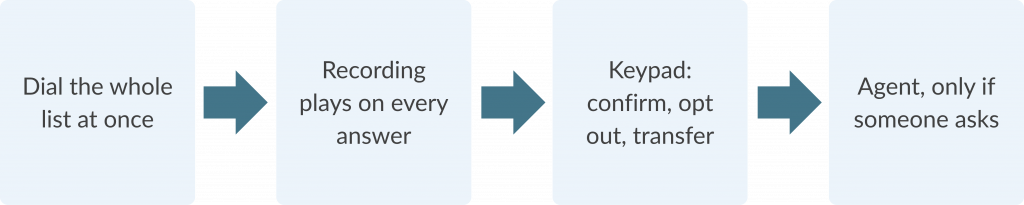
With a call blaster, the system dials, someone answers (or voicemail does), and the recording plays. If you’ve set up a keypad option, the person can confirm, opt out, or ask to be put through. Agents only come in at that last step, if they come in at all.
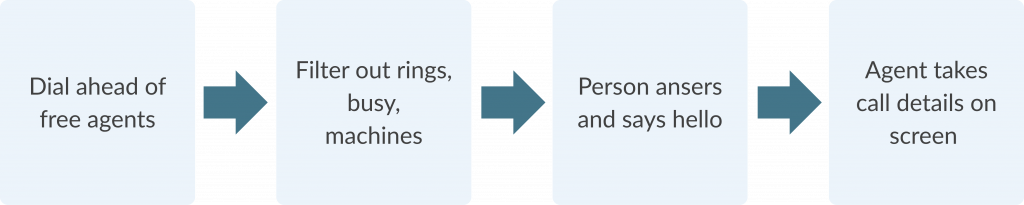
With an auto dialer, the system dials and listens. Unanswered calls, busy signals, and answering machines get filtered out. The moment a human says hello, the call goes to a free agent, ideally with the customer’s details already on screen. Agents are the heart of the process, and the dialer’s job is to keep them busy without leaving customers waiting.
A blaster call is built around the recording, a dialer call around the agent
Call Blaster:
One message to many people, no agent needed.
Auto Dialer:
Every live answer goes to an agent
5 Common Use Cases for Call Blaster Software
Call blasters shine when the message is the same for everyone and timing matters more than conversation. The ones I’ve seen work best:
- Appointment reminders for clinics, salons, and service visits
- Payment reminders sent before anything turns into a collections problem
- Outage and weather alerts from utilities and local authorities
- School and campus announcements
- Order and delivery updates
The benefit is reach and cost. You can tell ten thousand people the water will be off tomorrow in the time it takes one agent to make a few dozen calls. What you give up is any chance to answer the follow-up question, so I always tell teams to include a clear way to reach a human.
5 Common Use Cases for Auto Dialer Software
Auto dialers earn their keep whenever the call needs real back-and-forth. That usually means:
- Outbound sales, especially working through warm leads quickly
- Collections, where every account has its own story
- Lead follow-up after a form fill or webinar
- Renewals and win-back campaigns
- Scheduled callbacks, so customers don’t have to sit on hold
The benefit here is agent productivity. On manual floors, I’ve watched agents lose a big chunk of every hour to rings and voicemail. A good dialer turns most of that into talk time, which is where revenue comes from.
Differences in Personalization and Interaction
Call blasters can be personalized more than people expect. Most platforms can drop in a name, an appointment time, or an amount due, and newer AI voices sound far less robotic. Still, everyone hears a version of the same script, and nobody gets to ask, “Okay, but what does that mean for me?”
Auto dialers flip this around. The personalization comes from the agent, who can see the customer’s history, pick up on their tone, and change direction mid-call. A recording can say your name. Only a person can notice you sound worried and slow down.
So, if your message needs empathy, judgment, or negotiation, a broadcast won’t carry it.
Call Blaster and Auto Dialer Performance Metrics
Each tool has its own scoreboard, and mixing them up makes review meetings awkward.
For a call blaster, I look at:
- How many calls actually got delivered
- The split between live answers and voicemail
- Keypad response rate
- Opt-outs, which tell you when you’re overdoing it
For an auto dialer, the numbers are about people and pace:
- Connect rate and right-party contacts
- Agent talk time versus idle time
- Abandoned call rate
- Sales, payment promises, or appointments booked
If someone shows you a broadcast campaign with an amazing “conversion rate,” ask how they defined it.
Compliance Considerations for Automated Calling
This is the section people skip, and it’s the one that can hurt most.
Call blasters sit squarely under robocall rules. In the US, the TCPA requires consent before prerecorded or artificial-voice calls to mobile numbers, and the FCC asks for written consent for telemarketing. A February 2026 Fifth Circuit ruling challenged that written-consent rule, but it still applies outside that circuit. AI-generated voices count as artificial voices too. And new FCC rules on revoking consent take effect on November 25, 2026.
Auto dialers have a different trap: abandoned calls. If someone answers and no agent is on the line within two seconds of their greeting, the call counts as abandoned, and you can abandon no more than 3% of live-answered calls per campaign in each 30-day period. Predictive dialers live right on that line.
In India, promotional calls must come from registered 140-series numbers and respect DND choices, while regulated banks, insurers, and government bodies use the 1600 series for service calls.
Either way, scrub your lists and keep your consent records.
How to Choose Between a Call Blaster and Auto Dialer
When a client asks me which one they need, I ask four questions back:
- Does the customer need to talk to you, or just hear from you?
- Do you have agents free to take the calls?
- Is the message the same for everyone, or does it depend on who picks up?
- What consent do you actually have for this list?
If the answers point to one-way, high-volume, and identical, go with a call blaster. If they point to conversation, judgment, and a staffed team, you want an auto dialer. Plenty of teams end up using both: a broadcast to remind people, then a dialer to follow up with everyone who pressed “speak to someone.”
Conclusion
Call blasters and auto dialers do different jobs. One gets a message out fast and cheap. The other puts your people into more of the conversations that matter. Work out which job you’re really hiring for, bring compliance into the room on day one, and the choice usually makes itself.
Frequently Asked Questions
A call blaster sends a prerecorded message to a large list at once, with no agent on the call. An auto dialer dials numbers automatically and connects the people who answer to live agents. The first is built for one-way announcements, the second for two-way conversations.
Rarely as the main tool. Selling means answering questions and handling objections, and a recording can’t do either. A blaster can support sales by announcing an offer or event and inviting people to press a key to speak to someone. Check your consent first, because prerecorded telemarketing calls face the strictest rules.
Yes, that’s the whole point. The dialer filters out unanswered calls, busy signals, and usually answering machines, then routes live answers to a free agent, often with the customer’s details already on screen. In predictive mode, it paces the dialing so agents stay busy without breaking abandoned-call limits.
A call blaster, in most cases. The message is short, and much the same for everyone, and a keypad option lets people confirm, cancel, or ask to reschedule. If lots of people need to rebook, send everyone who asks for help to an agent queue or a dialer follow-up list.
Yes, within limits. Most tools take keypad responses, so people can confirm, opt out, answer a simple survey, or request a callback, and some newer ones accept short spoken answers. Those responses show up in your campaign reports. Anything beyond a few fixed options needs a person.
Start with the goal: are you informing people or talking with them? Then weigh your agent capacity, list size, how personal the message has to be, and what consent you hold. Finally, check the rules in every market you call, how well the tool fits your CRM, the reporting you get, and your cost per useful contact rather than per call.