A First-Person Guide to Scaling High-Volume Outbound Calling Using Power Dialers

If you’ve been anywhere near high-volume outbound calling in the last decade, such as debt collections, tele sales, campaigns, renewal calling, political outreach, credit card upsell, insurance, loan follow-ups, verification calls, or appointment setting, you probably know the feeling:
Your best agents spend their day waiting.
Waiting for someone to pick up.
Waiting through voicemails.
Waiting through busy tones.
Waiting through unanswered dials.
I’ve run outbound teams where:
- Agents spent less than 15% of their day actually speaking
- Connect rates hovered below 8%
- The same lead list got hammered without intelligence
- Team morale fell simply because nobody felt productive
Then we brought in dialing automation.
The first week was chaotic, not because the tech was difficult, but because my agents looked at me and said:
This is unbelievable. I’m talking for 45 minutes every hour. Why weren’t we using this earlier?
That’s when I realized something fundamental:
Outbound calling doesn’t fail because of people. Outbound calling fails because of wasted time.
If your business thrives on speaking to hundreds or thousands of customers a day, your biggest enemy isn’t skill, it’s inefficiency.
Power dialers help you remove this inefficiency. So in this article, I want to take you through everything I’ve learned firsthand about power dialers:
Let’s get into it.
Why High-Volume Outbound Teams Need Power Dialer Automation
If you’re operating an outbound function today, you’re fighting uphill on these fronts:
1. Contact Rates Are Collapsing
People ignore numbers they don’t know. Spam filters block calls. Smartphones and telcos label calls as likely spam.
A dialer helps you maximize attempts without wearing down agents.
2. Human Dialing Time Is the Enemy
Every second spent:
- Searching the CRM
- Typing digits
- Updating sheets
- Logging calls
- Leaving voicemails
- Redialing
is a second not spent selling, convincing, negotiating, and collecting.
Automation gives agents more speaking time.
3. Compliance & Accuracy Are No Longer Optional
Dialers help with:
- DNC enforcement
- Region-based rules
- Safe pacing
- Local caller IDs
- Time-zone limits
Imagine a human doing this manually. That’s a legal outage waiting to happen.
4. AI and Voice Analytics Are Changing Expectations
Modern dialers are no longer just dialers. They:
- Detect answering machines
- Predict the best time to call
- Rotate caller IDs
- Trigger workflows
- Guide agents mid-call
Outbound isn’t manual anymore. It’s algorithmic performance.
5. The Labor Market Won’t Support Inefficiency Anymore
If a business expects:
- 100 calls/day/agent manually
They’ll hit a ceiling.
With a power dialer:
- 250–400 calls/day becomes normal without burning them out
Outbound performance today is simple:
More talk time equals more conversions.
More automation equals more talk time.
What Is a Power Dialer?
A power dialer is an outbound dialing system that automatically dials numbers from a list one by one for each agent and resumes dialing only when the agent is free.
So, unlike a manual dialer:
- Agents don’t type numbers
- The software fetches the lead
- The system dials instantly
- The call connects
- The agent talks
When the agent hangs up, the next call launches immediately.
That’s it.
It’s not magic.
It’s efficient orchestration.
How Does a Power Dialer Work: Step-by-Step Workflow
Here is a step-by-step logic.
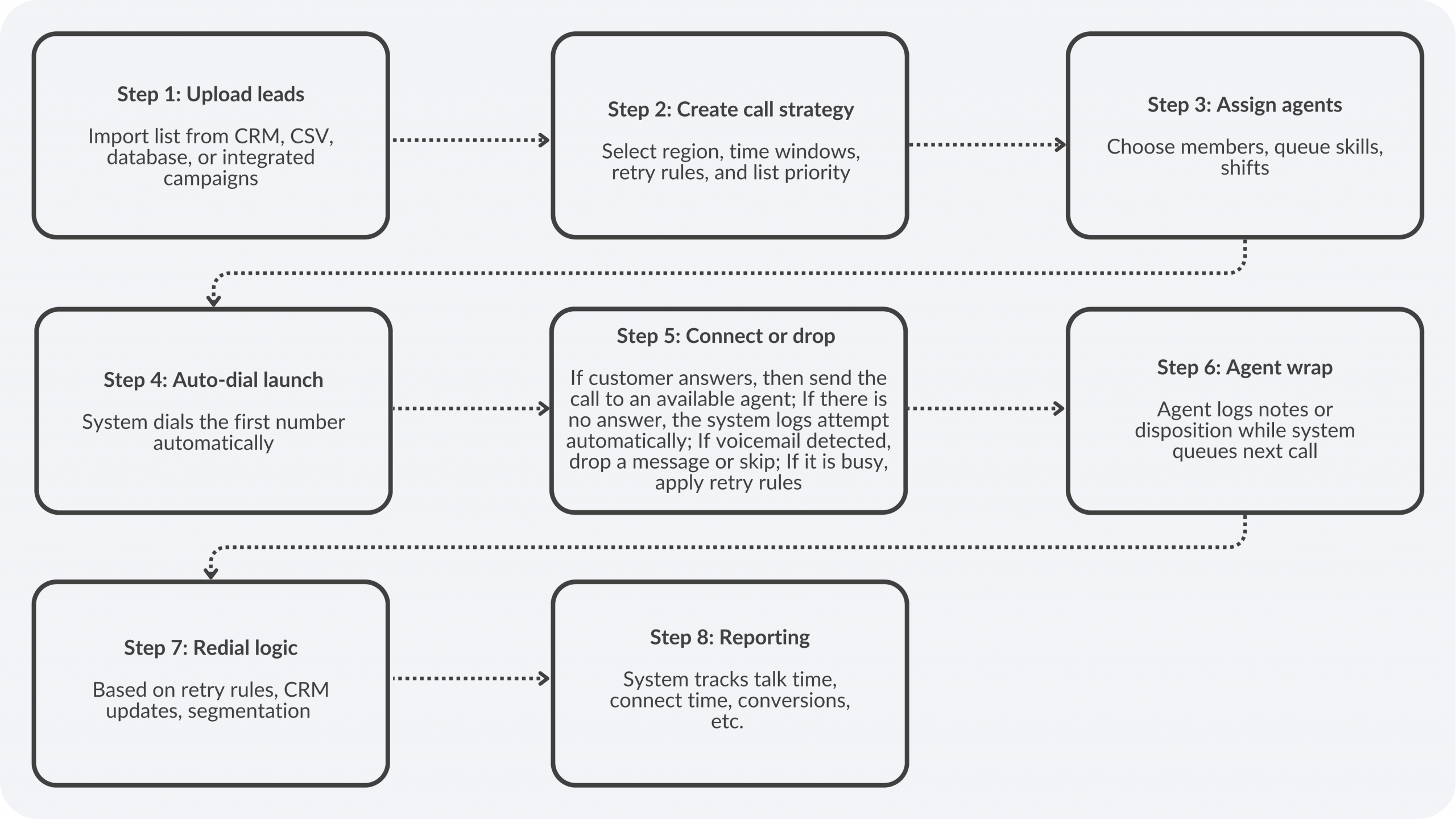
What is the core value that the power dialer provides?
Agents never waste time between calls.
Key Features of a Power Dialer
Outbound success boils down to one principle:
More talk time and less idle time without ruining customer experience.
So here are the features that genuinely move the dial, not the ones vendors love putting on brochures.
1. Automated Sequential Dialing
The dialer launches the next call as soon as the agent finishes the previous one.
This single feature alone can turn 70-80 calls/day into 200+.
2. Accurate Answering Machine Detection
Every voicemail your agent listens to is wasted productivity.
Good answering machine detection spots voicemail/beeps/fax tones fast, helping you keep connect rates healthy.
3. CRM/Lead Source Integration
No exporting spreadsheets. No manual logs.
The dialer pulls leads from Salesforce/Zoho/HubSpot and other systems and automatically updates them.
You’re paying agents to persuade, not type.
4. Dispositions, Wrap Codes & Auto-Logging
After each call, agents log outcomes quickly:
- Callback
- Wrong number
- Interested
- Never call again
This drives retargeting, follow-ups, and reporting. It’s how raw calling becomes a structured pipeline.
5. Time-Zone Calling Rules & Compliance Controls
The system prevents dialing outside legal/regional windows, thereby protecting you from fines and angry customers.
Outbound should never wake up Bengaluru at 6 am.
6. Callbacks & Follow-Up Reminders
Most deals die because someone forgets:
Call me after lunch.
One-click scheduling keeps opportunities alive. This is often the number one conversion booster.
7. Local Presence/Dynamic Caller IDs
People answer local numbers.
Rotating DIDs (within compliance boundaries) boosts pickup 20 to 40%.
It solves the biggest outbound challenge: avoiding unknown numbers.
8. Monitoring, Whisper Coaching, and Barge-In
Coaching should happen during the call, not afterward.
Supervisors can:
- Listen silently
- Whisper tips
- Join when needed
This dramatically reduces ramp time, especially in collections or sales.
9. Preview Mode for High-Value Leads
Not every lead should be blind-dialed.
Preview lets agents scan notes before calling. This is ideal for high-stakes sales, VIP prospects, and sensitive customer cases.
10. Campaign & List Prioritization
Outbound teams juggle buckets, such as fresh leads, recalls, renewals, and collections.
Dialers let you:
- Prioritize lists
- Pause dead ones
- Assign to top agents
Right lists ensure the right revenue.
11. DNC/Consent Enforcement
The dialer automatically blocks:
- Do-Not-Call numbers
- Customers who revoked consent
- Restricted regions
Manual compliance will always be a liability.
12. Real-Time Dashboards & Leaderboards
Live metrics create focus:
- Talk time
- Connect rate
- Right party contacts
- Conversions
Agents don’t compete on the notes they enter. They compete in conversations.
13. Voicemail Drop
When legal, one-click voicemail saves 20+ seconds per failed attempt; you’re reclaiming hours across hundreds of calls.
Outbound is a game of small efficiencies.
14. Smart Retry Logic
The dialer shouldn’t redial blindly.
Rules adjusted by:
- Time of day
- Lead type
- Day of week
- Previous response
Cadence matters more than aggression.
15. Skill-Based Routing and Agent Match
Top agents get high-value leads.
Language skills, risk expertise, objection handling, and route call accordingly.
Better fit results in better outcomes.
16. Disposition-Triggered Workflows
When the disposition says:
- Send quotation
- Call Friday
- Email the documents
These should auto-trigger tasks or CRM updates.
That’s how calling becomes automation-driven pipeline movement.
17. Recording + AI Call Scoring
Recordings matter only when scored.
AI can flag:
- Script adherence
- Objection handling
- Tone
- Sentiment
That’s real-time coaching fuel.
18. Payment/Ticket/Sales Integrations
Calling shouldn’t end at talk.
Trigger payments, create tickets, and push deals without juggling tabs.
Otherwise, you’re just making noise.
19. Cloud & Remote-Ready
Outbound must survive office closures, WFH shifts, and external teams.
A dialer should work anywhere securely, so productivity never stops.
Power Dialer vs. Predictive Dialer vs Auto Dialer
| Feature | Power Dialer | Predictive Dialer | Auto Dialer |
| Primary Goal | Boost agent talk time | Maximize throughput | Mass broadcast |
| Dial Logic | One-to-one dialing | Multiple lines per agent | Plays recorded messages |
| Best For | Sales, collections, callbacks | Enterprise outbound | Campaign blasts/ Call Blasting |
| Agent Availability | Mandatory | Predictive | Optional |
| Risk Level | Low | Medium-High (overdial risk) | Low |
| Customer Experience | High touch | Medium | Zero human touch |
| Compliance | High | Needs monitoring | High |
| AI Use | Medium | High | Minimal |
| Conversion Suitability | High | Very high | Very low |
If you want conversation-level interactions, power dialers win.
When Should Your Call Center Use a Power Dialer?
Use a power dialer when:
Your agents need to speak, and not spray calls
Outbound sales
Debt collections
Insurance follow-ups
Loan recovery
Your leads are valuable
You don’t want dropped calls.
Compliance matters
Predictive dialers can misfire legally.
You have small to mid-sized teams
Predictive dialers require volume.
Quality > Quantity
Power dialers favor depth.
You want faster results without getting overwhelmed
A 5-agent team suddenly becomes a 12-agent talk engine.
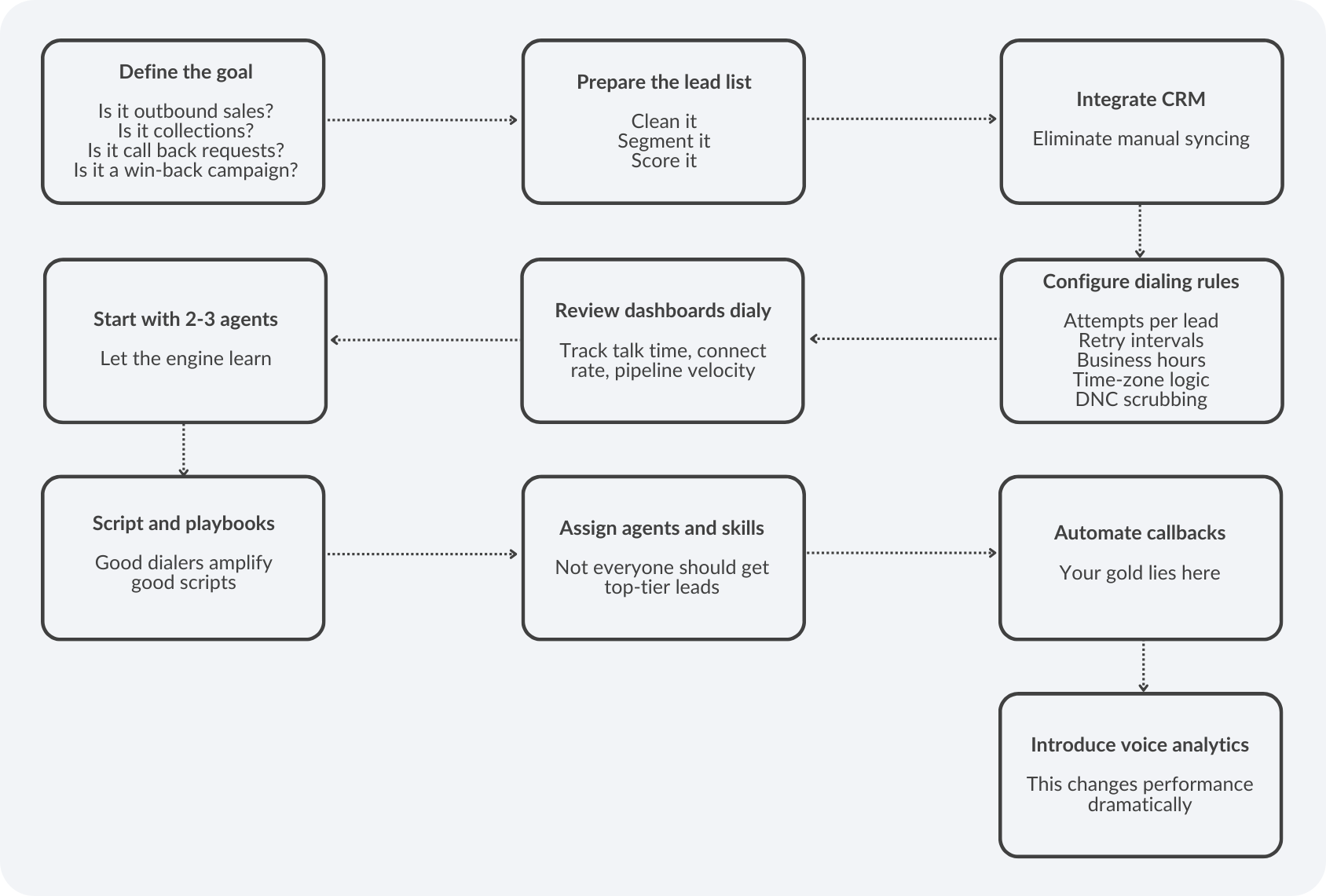
How to Set Up a Power Dialer? A Step-By-Step Guide
I’ve done this enough times that I can narrate this in my sleep.
Metrics That Show Your Power Dialer Is Working
Here are the seven metrics I obsess about:
#1 Agent talk time %
This is a north star metric.
Target: 45-55% per hour
#2 Connect rate
Target depends on industry, but push beyond 12-18%
#3 Calls per hour
Expect 200+ per hour with power dialers
#4 Call attempt-to-connect ratio
Lower is better.
#5 Conversion rate
The real business metric.
#6 First call close rate
Power dialers improve immediacy.
#7 Agent idle time
Cut it ruthlessly.
Common Mistakes to Avoid When Using a Power Dialer
I’ve made them all. Let me save you the trouble.
Mistake #1: Hammering the same list
Add dialing intelligence.
Add segmentation.
Add time-of-day design.
Mistake #2: Zero call scripting
Automation without strategy equals chaos.
Mistake #3: No voicemail strategy
Voicemail drops are still gold.
Mistake #4: No compliance guardrails
DNC slips become lawsuits.
Mistake #5: Measuring only volume
Measure conversations and not attempts
Mistake #6: Ignoring wrap codes
This destroys reporting and coaching.
Mistake #7: No coaching layer
Dialers won’t fix a bad pitch.
Why Choose ClearTouch’s Power Dialer
I’ll say it the way I say it to customers:
ClearTouch power-dials the way real call-center operators work, and not the way software likes to imagine call centers work.
Here’s what makes it stand out:
- Superior answering machine detection: Reduces dead-air moments
- DID rotation and local presence: Higher pickup, resulting in higher conversions
- CRM and LMS integration: Training and calling in one workflow
- Real-time coaching: Supervisors whisper into calls
- AI-assisted productivity: Sentiment detection, call scoring, playbook nudges, compliance cues
- Collections-grade compliance: TCPA, FDPA, GDPR, and regional restrictions
- 24/7 support: Across email, voice, and WhatsApp, and this has been our unfair advantage
- Pay-per-use: Outbound scaling without CFO panic
I keep hearing executives say:
Outbound is declining. Nobody answers.
Wrong.
Bad outbound is dying.
Spray-and-pray is dying.
Manual dialing is dying.
But data-driven, AI-guided, performance-monitored outbound is scaling like never before.
A good power dialer:
- Speeds up outreach
- Protects agents
- Improves compliance
- Increases connects
- Multiplies talk time
- Raises conversions
Outbound revenue is still sitting where it always sat, which is on conversations.
A power dialer just gets you into more of them.